cookie

This site uses cookies to provide you with a great user experience. By visiting monetamarkets.com, you accept our cookie policy.

Allow all
top icon

Important Information

Visitors in the United Kingdom
This website is operated by companies within the Moneta Markets group that are licensed or registered outside the United Kingdom. None of them is authorised or regulated by the UK Financial Conduct Authority (FCA).

UK residents
This website is intended for visitors outside the United Kingdom and is not intended to promote or offer services to UK residents through the overseas Moneta Markets group entities.

UK residents wishing to access Moneta Markets services should visit the dedicated UK website operated by Moneta Markets Capital Ltd, a separate FCA-authorised group company, which provides services to Professional Clients only.

By continuing to the global website, you acknowledge that it is intended for persons outside the United Kingdom and that you are accessing it in that capacity.

Moneta Markets

Please note that Moneta Markets operates this website and its services are not directed at residents of your jurisdiction.

The information on this site is not intended for distribution to, or use by, any person in any country or jurisdiction where such distribution or use would be contrary to local law or regulation.

If you have arrived here in error, we kindly advise you to exit the site.

Continue to Site
Moneta Markets
BBack Back to Blog Home

What is the Force Index indicator?

December 16, 2022 | monetaeditor

What is the Force Index indicator?

What is the Force Index indicator?

The Force Index is a technical analysis indicator that uses price and volume to measure the strength of a trend. It is calculated by multiplying the direction of a price move (up or down) by the volume associated with that move. The resulting value, known as the Force Index, is then plotted on a chart to help traders identify potential trend changes and other important market information.

How is it used by traders?

Traders typically use the Force Index to confirm the strength of a trend and to identify potential trend changes. For example, a rising Force Index may indicate that a trend is gaining strength and that further upside is likely, while a falling Force Index may suggest that the trend is losing momentum and that a reversal could be imminent. Traders can also use the Force Index to identify potential buying and selling opportunities based on the strength of the underlying trend.

How can I add Force Index to a chart in MT4 or MT5?

To add the Force Index to a chart in MetaTrader 4 (MT4) or MetaTrader 5 (MT5), follow these steps:

  1. Open the chart for the currency pair, stock, or other instrument that you want to analyze.
  2. Click on the ”Insert” menu at the top of the chart and select ”Indicators” from the drop-down list.
  3. In the ”Indicators” window, scroll down until you find the ”Force Index” and then double-click on it to add it to the chart.
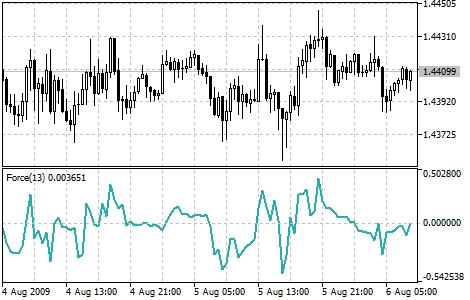
  4. The Force Index will appear on the chart as a separate window below the main price chart.
  5. You can customize the appearance of the Force Index by right-clicking on it and selecting ”Properties” from the context menu. This will open the ”Force Index” properties window, where you can change the color, line style, and other settings for the indicator.
  6. Once you have customized the Force Index to your liking, click ”OK” to apply the changes and close the properties window. The updated Force Index will be displayed on the chart.

Force Index - MT5 chart picture

You might also like

Arrow
Arrow
What is the Force Index indicator?

Start Trading in 3 Simple Steps

1
REGISTER

Open a live account and start trading in just minutes.

2
FUND

Fund your account using a wide range of funding methods.

3
TRADE

Access 1000+ instruments across all asset classes

open chat